
Inviting agents in Poppo Live is a simple process once you already have access to the “Agent” menu. You only need to copy your invitation link, share it with the person who wants to become an agent, and ask them to complete the registration with their Poppo ID and verification code.
In this guide, you will learn how to invite agents, how to confirm that they were linked, where to view their results, and how to check the commissions generated from the app or the agent web dashboard.
Poppo inviter ID usually refers to the invitation information connected to an agent link. Use the link generated in the Invite agent section of your account. The invited person should open that link and complete the requested registration and verification details.
In this guide
What you need before inviting agents
Before inviting other agents, make sure your agent account is active and that you have access to the “Agent” menu from the app or to Poppo’s web dashboard.
- Have an active agent account in Poppo Live.
- Access the “Agent” menu from the app or the web dashboard.
- Find the “Invite agent” option.
- Copy your invitation link.
- Share the link with the person who wants to register as an agent.
How to invite agents step by step
The process for inviting agents consists of copying your personal invitation link and sharing it with the person you want to link to your agency network.
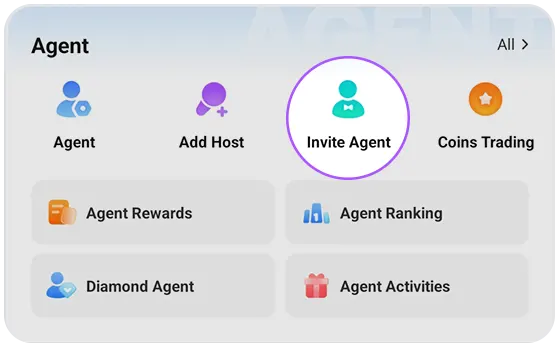
- Open Poppo Live and log in with your account.
- Go to the “Agent” menu.
- Look for the “Invite agent” option.
- Press the invite button.
- Copy your invitation link.
- Share it through WhatsApp, Messenger, Facebook, or another platform.
- Ask the invited person to complete the registration using that link.
It is important that the person uses your invitation link. If they register through another link or another agency, they may not be linked to your network.
How the invited agent registers
After receiving your link, the invited person must open it and complete the agent registration form. To do this, they usually need their Poppo ID and the verification code requested by the system.
- The invited agent opens your invitation link.
- They enter their Poppo ID in the form.
- They request the verification code.
- They enter the code received.
- They submit the registration form.
- Once linked, you will be able to see them in your invited agents list.
If the invited agent does not appear right away, wait a few minutes and check again from the app or from the agent web dashboard.
Where to view your invited agents and their results
After inviting agents, you can check whether they were linked and follow up on their results from the app or from the agent web dashboard. This information helps you see which agents are active, how many hosts they have, and what performance they are generating.
From the Poppo Live app
From the app, go to the “Agent” menu and then look for the option to manage your agency or view “My Agency”. There, you can review the list of linked agents and some basic activity details.
- Invited agents linked to your agency.
- Number of hosts associated with each agent.
- Earnings or performance generated according to the available information.
- General status of your agency network.
From the agent web dashboard
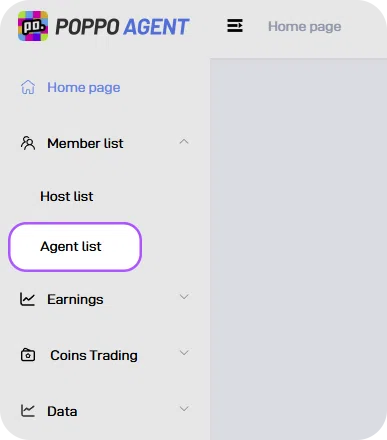
From the Poppo agent web dashboard, you can review your invited agents in the members section. In the side menu, go to “Member list” and then open Agent list.
- ID: identifier of the invited agent.
- Profile: image or profile of the agent.
- Nickname: visible name of the agent.
- Country: country associated with the account.
- Time to bind: linking date and time.
Invited agent earnings
You can also review the financial performance of your invited agents from the web dashboard. In the “Earnings” menu, open Invite agent earnings to view the earnings generated by each agent, their commission rate, and the commission that belongs to you.
- Invite agent earnings: earnings generated by the invited agent.
- Invite agents commission rate: commission rate of the invited agent.
- My Commission: commission generated for your agency.
- You can also filter by date or search by ID from the web dashboard.
If an invited agent does not appear in the list, confirm that they completed the registration from your invitation link and wait a few minutes before checking again.
Benefits of inviting agents
Inviting agents allows you to grow your network beyond your own hosts. Each invited agent can build their own team and generate activity inside the platform.
- You can expand your agency network with new agents.
- Your invited agents can add their own hosts.
- The performance of invited agents can help you generate more income.
- A more active network can contribute to your agency’s growth.
- You can review results from the app or from the agent web dashboard.
How the commission for invited agents is calculated
The commission for invited agents depends on the difference between your commission rate as the main agent and the invited agent’s rate. That difference is applied to the performance generated by the invited agent.
Invited-agent commission = difference between your rate and the invited agent’s rate × earnings generated by that agent.
For example, if your commission level is higher than the invited agent’s level, you can receive a commission based on that difference and on the performance of their agency. In the web dashboard, you can review these details from “Invite agent earnings”, where the invited agent’s earnings, their commission rate, and the “My Commission” value appear.
Rates, conditions, and calculations may vary depending on the agency level and the information shown in the Poppo dashboard for each period.
Common issues when inviting agents
If an invited agent does not appear or cannot complete the registration, first check that they used your invitation link and submitted the form correctly.
- The invitation link did not open correctly.
- The person entered their Poppo ID incorrectly.
- The verification code did not arrive or expired.
- The invited agent did not complete the form.
- The account was already linked to another agency.
- The dashboard has not yet updated the new invited agent’s information.
Not a Poppo Live agent yet?
To invite agents, you need agent access. If your account is not active yet, first review how to register as a Poppo Live agent and access the dashboard from the app or web.
Frequently asked questions
-
Where do I invite agents in Poppo Live?
You can invite agents from the Agent menu, using the Invite agent option.
-
What should the person who receives my link do?
They should open your invitation link, enter their Poppo ID, request the verification code, and submit the agent registration form.
-
Where do I view my invited agents?
You can view your invited agents from the app in the Agent menu or from the web dashboard, in the agent list section.
-
What information can I see about my invited agents?
You can review details such as ID, profile, nickname, country, linking date, number of hosts, earnings, and generated results, depending on the information available in the dashboard.
-
How do I earn commission from invited agents?
You can earn commission based on the difference between your commission rate and the invited agent’s rate, applied to the performance generated by that agent.
-
Why doesn’t my invited agent appear?
This can happen if they did not complete the registration, used another link, already belong to another agency, or if the dashboard has not yet updated the information.