
To withdraw earnings in Poppo Live, go to “Points”, tap “Withdraw now”, link a withdrawal method, enter the available amount, and confirm the request with your 6-digit security password. The minimum withdrawal usually starts from 100,000 points, equivalent to 10 USD.
How to withdraw earnings step by step
These are the steps to request a withdrawal from the Poppo Live app:
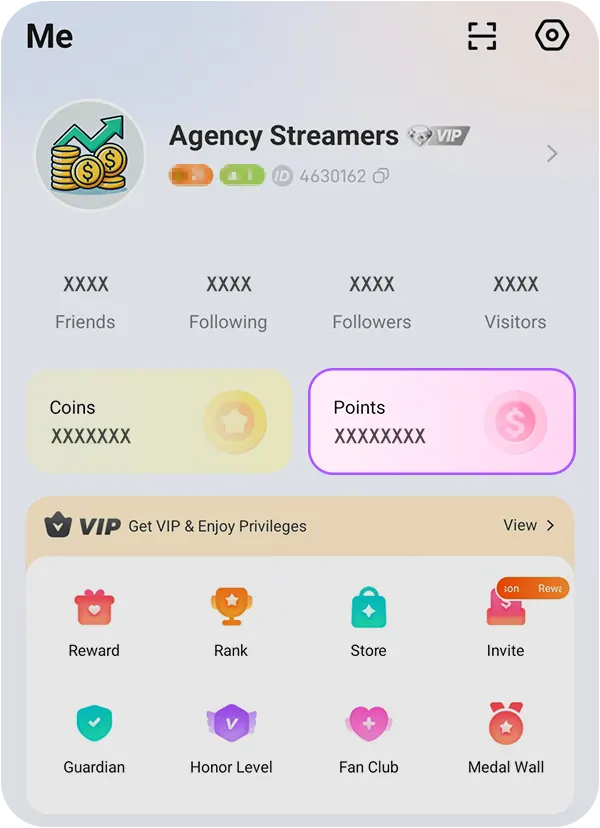
- Open the Poppo Live app and log in.
- Go to your profile or “Me” menu.
- Tap the “Points” section.
- Press the “Withdraw now” button.
- Review the amount available to withdraw.
- Select or link your withdrawal method.
- Enter the amount you want to withdraw.
- Confirm the withdrawal request.
- Enter your 6-digit security password.
If you do not have a withdrawal method linked, go to “Withdrawal method”, choose an option available for your country, and complete the required details.
After confirming, the withdrawal will remain in process according to Poppo’s method, fee, and review time.
Also in this guide
How much points are worth in Poppo Live
In Poppo Live, earnings are shown as points. In general, 10,000 points equal 1 USD. This means that 100,000 points equal 10 USD, which is the minimum amount from which you can usually start requesting withdrawals.
- 10,000 points = 1 USD.
- 100,000 points = 10 USD.
- The minimum withdrawal starts from 100,000 points.
- The withdrawable balance may vary depending on the platform’s active rules.
Before withdrawing, check the available balance, exchange rate, fee for the selected method, and final amount you will receive in the app.
Available withdrawal methods
Available withdrawal methods may vary depending on the country and account. In the app, go to “Withdrawal method” to see which options are available for you and link the one you prefer.
- USDT TRC20: crypto withdrawal using the TRC20 network.
- Binance BEP20: withdrawal to an account or address compatible with BEP20.
- Bank transfer: available in some countries.
- Epay: withdrawal option if it appears available in your account.
- Payoneer: may be available for some users or regions.
Before withdrawing, review the fee, arrival time, and details for the selected method.
How to create or recover your security password
To confirm a withdrawal in Poppo Live, you need a 6-digit security password. This password is used for sensitive operations such as withdrawals and is not the same as your regular login password for the app.
If you have not set it up yet, or if you forgot it, you can create, change, or recover it from your account settings menu.
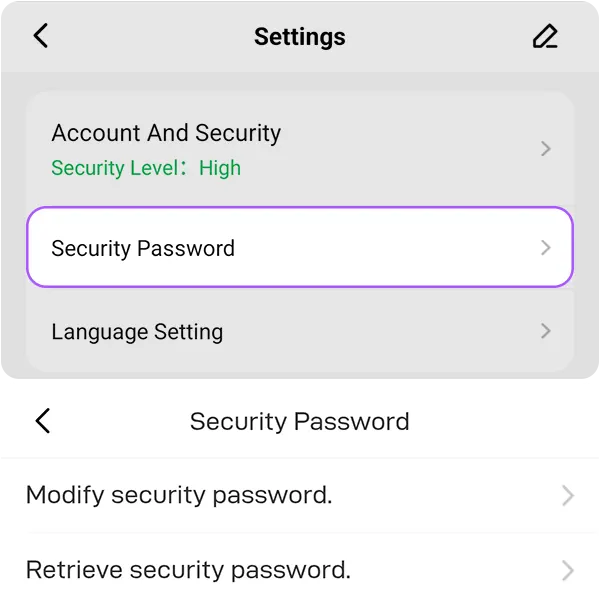
- Open Poppo Live and log in to your account.
- Go to your profile or “Me” menu.
- Tap the “Settings” icon.
- Go to “Security password”.
- Choose “Change security password” if you want to change it.
- Choose “Recover security password” if you forgot it.
- Follow the verification instructions shown in the app.
When you request a withdrawal, Poppo will ask for this password to confirm the operation. Keep it in a safe place and do not share it with anyone.
Withdrawal rules, fees, and processing times
Before confirming a withdrawal in Poppo Live, always review the conditions shown in the app. Available methods, fees, and arrival times may vary depending on the country, account, and selected withdrawal method.
- Fees: some methods may apply a commission or processing charge.
- Arrival time: this may vary depending on the method used and the platform review.
- Method details: carefully check the address, account, or bank information before confirming.
- Withdrawable balance: the app will show the available amount to withdraw already converted to USD.
If you are withdrawing by cryptocurrency, verify that the network is correct, for example USDT TRC20 or Binance BEP20, depending on the option available in your account. Sending funds to the wrong network can cause loss of payment.
Common issues when withdrawing earnings
If you cannot withdraw your earnings, first check that you have the required minimum, an active withdrawal method, and the security password configured correctly.
- You have not reached the 100,000-point minimum.
- You do not have a withdrawal method linked.
- The withdrawal method is not available in your country.
- You entered the account, wallet, or payment address details incorrectly.
- The security password is incorrect or was forgotten.
- The request is under review and has not been processed yet.
- The app shows a different balance because some points are not yet available for withdrawal.
If the withdrawal does not move forward, check the request status inside the app and confirm that all details are correct. You can also try updating the app or checking whether Poppo displays any notice about the selected withdrawal method.
Not a Poppo Live agent yet?
To generate commissions and withdraw earnings as an agent, you first need access to the agent dashboard. If your account is not active yet, review how to register as a Poppo Live agent and start managing hosts, invited agents, and commissions.
Frequently asked questions
-
How many points do I need to withdraw in Poppo Live?
10,000 points equal 1 USD, and you can usually withdraw from 100,000 points, equivalent to 10 USD.
-
Where do I withdraw my earnings in Poppo Live?
From the app, go to the Points section and then tap Withdraw now to start the request.
-
What withdrawal methods does Poppo Live have?
Methods may vary by country. Some options may include USDT TRC20, Binance BEP20, bank transfer, Epay, or Payoneer, if they are available in your account.
-
What is the security password?
It is a 6-digit password that Poppo requests to confirm withdrawals and other sensitive operations. It is not the same as the regular login password.
-
Where do I create or recover the security password?
You can create, change, or recover it from the Settings menu by going to Security password.
-
Why can’t I withdraw my earnings?
This can happen if you have not reached the withdrawal minimum, if you do not have a linked method, if the security password is incorrect, or if the selected method is not available in your country.